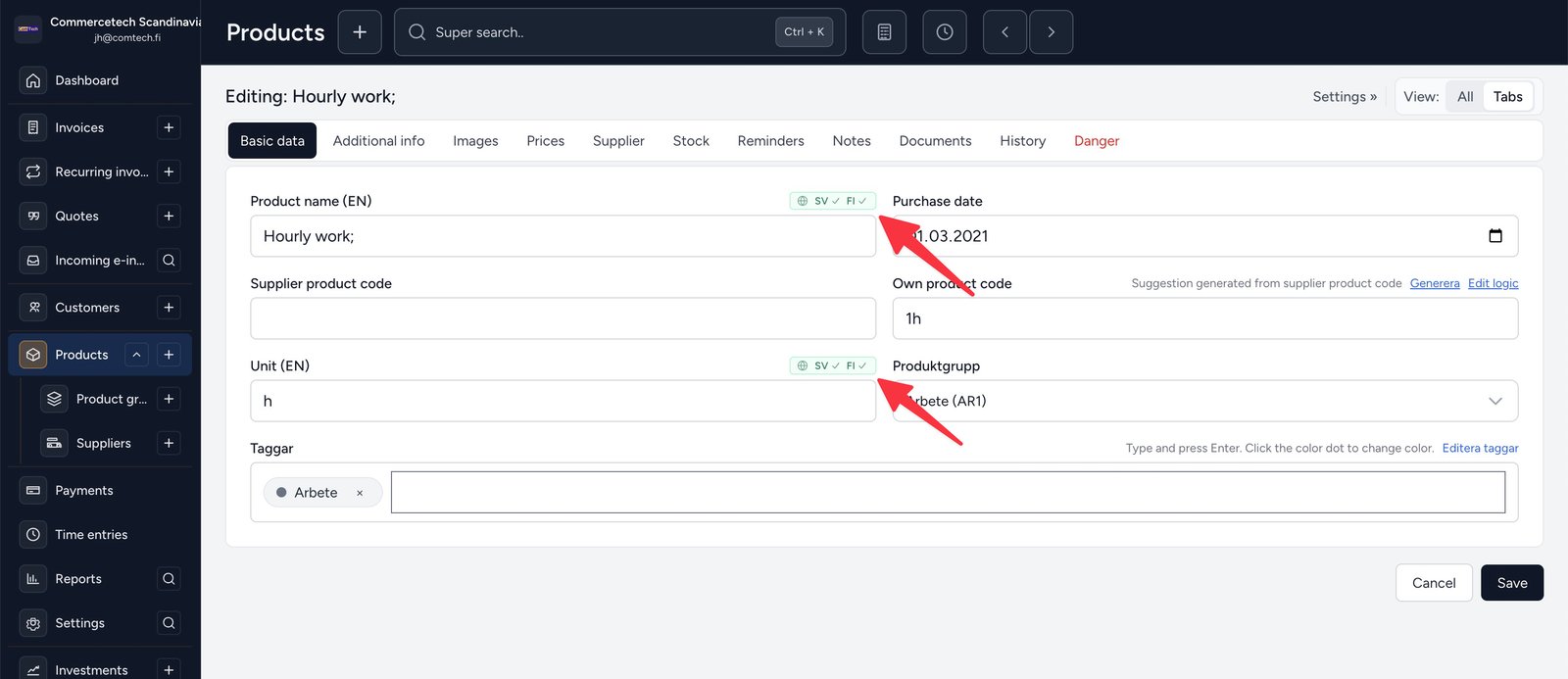
We have expanded auto-translation so it is available where it matters – not only on product names, but on more texts that you, your colleagues and your customers see.
How it works
- Write the text in the main field in your app language (the same language you chose for the interface).
- Click the small translation control (globe + other languages) next to the field.
- The app suggests the other languages. Adjust if needed, then save.
Example: if your app is in Finnish, you write in Finnish and translations are fetched into Swedish and English. If your app is in Swedish, English and Finnish are fetched – and so on.
Translations are stored with the record. When a customer uses English or Finnish, the matching text is used automatically – for example on invoice PDFs and e-invoices.
Which technology is used?
Suggestions come from MyMemory, an established translation API. The app sends the text to the service and shows the result as a draft you can edit before saving. It is an assistant – you always have the final say.
Longer texts are split into chunks so translation still works for longer descriptions and invoice texts.
Where is it available?
- Products – name, unit and description
- Invoices – additional text, line descriptions and default invoice text in settings
- VAT rates and product categories
- Program news (like this one)
System invoice types (Normal, e-invoice, credit invoice and more) have built-in translations and are synced automatically for new companies as well.
Tip: if a translation is missing, whichever text exists is used as a fallback – so nothing appears empty for the customer.